Electricity · Benin Electricity
Buy BEDC Token Online
Buy Benin Electricity (BEDC) prepaid tokens and pay postpaid bills from your Mabro wallet. Your meter is checked before you pay, and tokens arrive instantly in the app and by SMS.
Updated 10 November 2026 · Reviewed by the Mabro team
About Benin Electricity (BEDC)
Benin Electricity Distribution Company serves Edo, Delta, Ondo and Ekiti. Its area runs from Benin City and the Delta towns of Warri, Asaba and Sapele to Akure and Ado-Ekiti in the south-west.
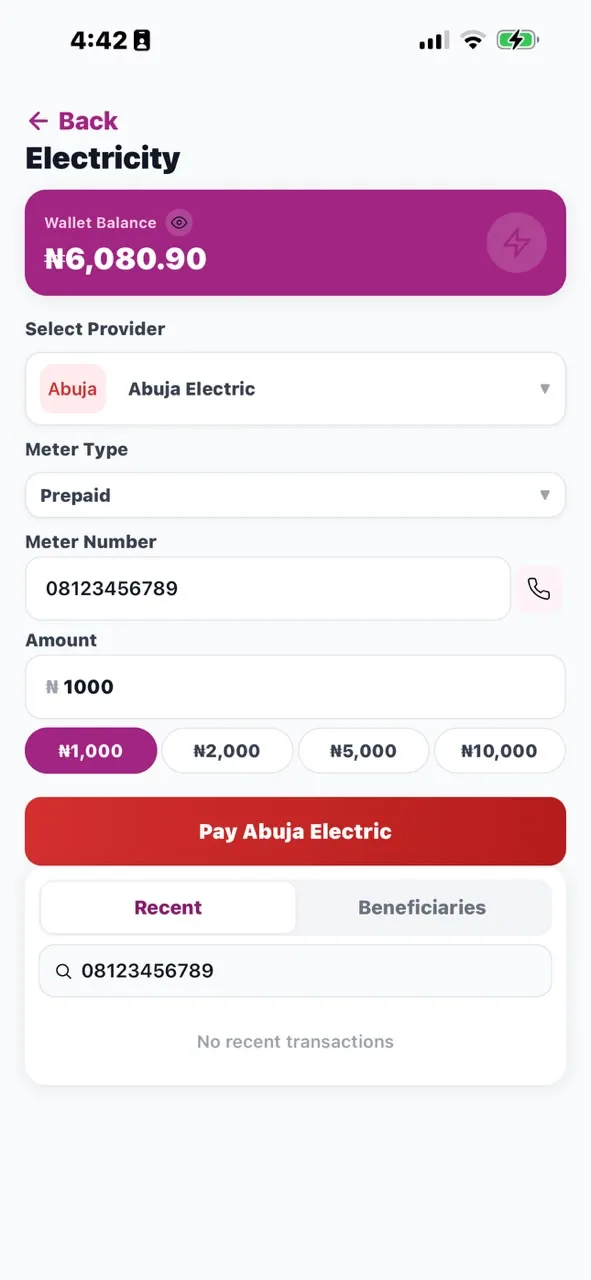
On Mabro you can buy BEDC prepaid tokens and pay BEDC postpaid bills from your wallet. The app checks your meter or account number with Benin Electricity before you pay, shows you the customer name to confirm, and delivers prepaid tokens instantly in the app and by SMS.
Is BEDC your DisCo?
| Area served | Main cities and towns |
|---|---|
| Edo, Delta, Ondo and Ekiti | Benin City, Warri, Asaba, Sapele, Akure, Ondo and Ado-Ekiti |
Ekiti and Ondo border areas served by Ibadan Electricity, and Delta borders Port Harcourt Electricity's area. If you are near a state boundary, use your bill or a previous receipt to confirm you are on BEDC.
Coverage is a general guide; DisCo boundaries do not always follow state lines. Your bill, meter card or a previous token receipt names your DisCo. Neighbouring DisCos: IBEDC (Ibadan Electricity) · PHED (Port Harcourt Electricity).
How to buy a BEDC prepaid token on Mabro
Open Electricity
Tap Electricity on the Mabro home screen.
Choose Benin Electricity and Prepaid
Select Benin Electricity (BEDC) from the provider list, then Prepaid.
Enter your BEDC meter number
The app validates it with Benin Electricity and shows the customer name and address. Make sure it is yours.
Enter the amount and confirm
The minimum for BEDC is shown in the app. Confirm with your 6-digit PIN.
Get your token instantly
Your 20-digit BEDC token appears in the app and by SMS. Load it on your meter.
Save your BEDC meter as a beneficiary and your next purchase takes a few taps.
Paying a BEDC postpaid bill
If you are on a postpaid Benin Electricity account, choose Postpaid instead, enter the account number from your BEDC bill, check the customer name, and pay the bill amount or more. The payment is applied to your BEDC account and recorded in your Mabro history with a reference — keep it in case Benin Electricity's records take time to update.
Loading your BEDC token
On most BEDC keypad meters, type all 20 digits and press Enter (on some models it is # or a coloured key). On split meters, use the indoor unit. If the meter shows "Reject", "Used" or asks for key change tokens, read our step-by-step guide to loading a prepaid meter token.
BEDC tariff bands
Like every DisCo, Benin Electricity places each feeder in a NERC tariff band from A to E, based on the hours of supply it is expected to deliver. Band A has the most hours and the highest price per unit. Your band is set by BEDC for your feeder; it does not depend on where or how you buy your token. If your supply regularly falls well short of your band's promise, raise it with Benin Electricity through its official customer care channels. More in our guide to tariff bands.
BEDC troubleshooting
- Token not received: check your Mabro history — the token is shown there. If it is missing after 2 minutes, contact support with the reference.
- Token rejected: re-enter it slowly, and confirm you chose Benin Electricity (not a neighbouring DisCo) and the right meter number.
- Units but no light: that is a supply issue, not a token issue. Check whether neighbours are off, and contact Benin Electricity if it is an outage or fault.
- Estimated or disputed bill: complain to Benin Electricity's customer care with your account number and keep the complaint reference; unresolved complaints can be escalated to NERC's Forum Offices.
Why pay BEDC on Mabro
- Instant BEDC tokens in the app and by SMS.
- Meter validation with Benin Electricity before you pay.
- Cashback on eligible electricity payments.
- Buy for anyone on BEDC — family, tenants, a shop.
- Every DisCo in one app — see the full electricity guide.
Frequently asked questions
How do I buy a BEDC token online?
Open Mabro, tap Electricity, choose Benin Electricity and Prepaid, enter your meter number, check the customer name, enter the amount and confirm with your PIN. The token arrives instantly in the app and by SMS.
Which areas does Benin Electricity cover?
Edo, Delta, Ondo and Ekiti, including Benin City, Warri, Asaba, Sapele, Akure, Ondo and Ado-Ekiti. Confirm your DisCo from your bill or a previous receipt.
How do I pay my BEDC postpaid bill online?
Choose Benin Electricity and Postpaid in the Mabro app, enter the account number on your BEDC bill, check the customer name, enter the amount and confirm.
How long does it take to get my BEDC token?
Tokens are delivered instantly. If you do not receive one within 2 minutes, contact support with the transaction reference.
Can I buy BEDC electricity for someone else?
Yes. Enter their BEDC meter number; the app shows the customer name so you can confirm it before paying.
What is the minimum BEDC token I can buy?
The minimum for Benin Electricity is shown in the app when you enter your meter number.
My BEDC token was rejected. What should I do?
Re-enter it carefully, then check that you chose Benin Electricity and the correct meter number. If it still fails, contact support with the reference.
Do I get cashback on BEDC payments?
Yes. Eligible electricity payments earn cashback, credited to your Mabro wallet. The amount is shown in the app.
Other Mabro services
Buy your BEDC token in seconds
Download Mabro, save your BEDC meter, and never queue for a token again.
Get the App